
CoursePricer allows students to generate course quotes.
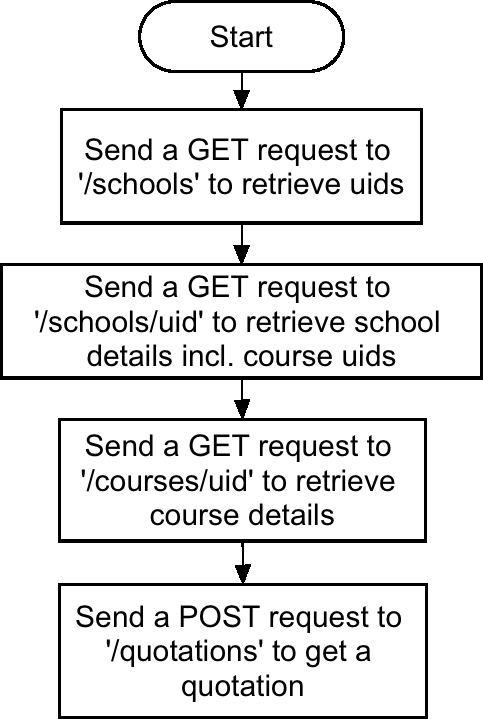
A typical flow is described in the flow-chart below:
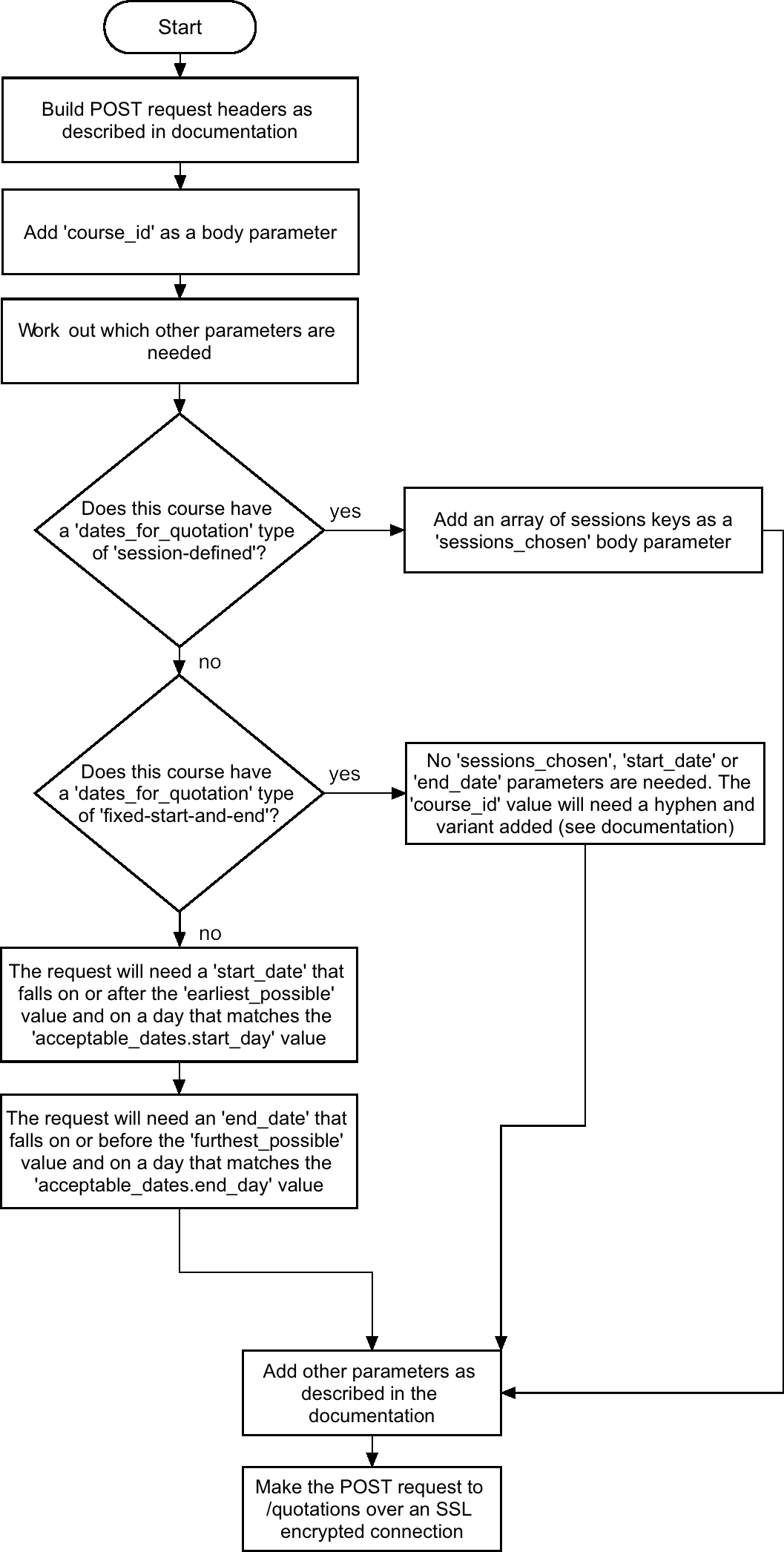
The diagram below should help you build up a request to the quotations endpoint:
The CoursePricer API is built on REST principles. Authenticated users can interact with any of our URIs by using the specified HTTP request method and endpoint.
https://api.coursepricer.comSSL encryption is required for all requests.
All requests to the CoursePricer API require authentication. In order to do this you must send the correct HTTP header with the correct API token. CoursePricer has one type of API token:
AuthorizationRetrieve all school uids and/or school details.
| Content-Type | required application/json |
|---|---|
| Authorization | required This token can be found inside the API section of your CoursePricer account. |
| expand | optional If set to true, complete school details will be retrieved. Default is false. |
|---|---|
| region NEW | optional If set to a region string e.g. "Ireland", schools from that region will be returned. |
curl "https://api.coursepricer.com/schools" \
    -X GET \
    -H "Content-Type: application/json" \
    -H "Authorization: Bearer <Your API Token>"
curl "https://api.coursepricer.com/schools?expand=true" \
    -X GET \
    -H "Content-Type: application/json" \
    -H "Authorization: Bearer <Your API Token>"
<?php
    $client = new GuzzleHttp\Client();

    $res = $client->request('GET', 'https://api.coursepricer.com/schools', [
        'headers' => [
            'Authorization' => 'Bearer <Your API Token>',
            'Content-Type' => 'application/json'
        ]
    ]);

    echo $res->getBody();
<?php
    $client = new GuzzleHttp\Client();

    $res = $client->request('GET', 'https://api.coursepricer.com/schools?expand=true', [
        'headers' => [
            'Authorization' => 'Bearer <Your API Token>',
            'Content-Type' => 'application/json'
        ]
    ]);

    echo $res->getBody();
Retrieve all details of a single school by uid.
| Content-Type | required application/json |
|---|---|
| Authorization | required This token can be found inside the API section of your CoursePricer account. |
curl "https://api.coursepricer.com/schools/<School UID value>" \
    -X GET \
    -H "Content-Type: application/json" \
    -H "Authorization: Bearer <Your API Token>"
<?php
    $client = new GuzzleHttp\Client();

    $res = $client->request('GET', 'https://api.coursepricer.com/schools/<School UID value>', [
        'headers' => [
            'Authorization' => 'Bearer <Your API Token>',
            'Content-Type' => 'application/json'
        ]
    ]);

    echo $res->getBody();
Retrieve all course uids and/or course details.
| Content-Type | required application/json |
|---|---|
| Authorization | required This token can be found inside the API section of your CoursePricer account. |
| expand | optional If set to true, complete course details will be retrieved. Default is false. |
|---|---|
| active_only | potentially required If set to false, inactive courses will be included. Default is true. |
| remove_expiring_courses | optional If set to true, all courses that are due to expire within 7 days will be removed. Default is false. |
| school_uid | optional If set to a school uid, all courses that are related to this school will be retrieved. Default is all courses that the API user has access to. |
curl "https://api.coursepricer.com/courses" \
    -X GET \
    -H "Content-Type: application/json" \
    -H "Authorization: Bearer <Your API Token>"
curl "https://api.coursepricer.com/courses?expand=true&active_only=true&remove_expiring_courses=true" \
    -X GET \
    -H "Content-Type: application/json" \
    -H "Authorization: Bearer <Your API Token>"
<?php
    $client = new GuzzleHttp\Client();

    $res = $client->request('GET', 'https://api.coursepricer.com/courses', [
        'headers' => [
            'Authorization' => 'Bearer <Your API Token>',
            'Content-Type' => 'application/json'
        ]
    ]);

    echo $res->getBody();
<?php
    $client = new GuzzleHttp\Client();

    $res = $client->request('GET', 'https://api.coursepricer.com/courses?expand=true&active_only=true&remove_expiring_courses=true', [
        'headers' => [
            'Authorization' => 'Bearer <Your API Token>',
            'Content-Type' => 'application/json'
        ]
    ]);

    echo $res->getBody();
Retrieve all details of a single course by uid.
| Content-Type | required application/json |
|---|---|
| Authorization | required This token can be found inside the API section of your CoursePricer account. |
curl "https://api.coursepricer.com/courses/<Course UID value>" \
    -X GET \
    -H "Content-Type: application/json" \
    -H "Authorization: Bearer <Your API Token>"
<?php
    $client = new GuzzleHttp\Client();

    $res = $client->request('GET', 'https://api.coursepricer.com/courses/<Course UID value>', [
        'headers' => [
            'Authorization' => 'Bearer <Your API Token>',
            'Content-Type' => 'application/json'
        ]
    ]);

    echo $res->getBody();
Retrieve all quotation details.
| Content-Type | required application/json |
|---|---|
| Authorization | required This token can be found inside the API section of your CoursePricer account. |
| expand | optional If set to true, complete quotation details will be retrieved. Default is false. |
|---|---|
| limit | optional If set to a number, n, the result set will be limited to n results. Default is 1000. |
curl "https://api.coursepricer.com/quotations" \
    -X GET \
    -H "Content-Type: application/json" \
    -H "Authorization: Bearer <Your API Token>"
curl "https://api.coursepricer.com/quotations?limit=2000" \
    -X GET \
    -H "Content-Type: application/json" \
    -H "Authorization: Bearer <Your API Token>"
<?php
    $client = new GuzzleHttp\Client();

    $res = $client->request('GET', 'https://api.coursepricer.com/quotations', [
        'headers' => [
            'Authorization' => 'Bearer <Your API Token>',
            'Content-Type' => 'application/json'
        ]
    ]);

    echo $res->getBody();
<?php
    $client = new GuzzleHttp\Client();

    $res = $client->request('GET', 'https://api.coursepricer.com/quotations?limit=2000', [
        'headers' => [
            'Authorization' => 'Bearer <Your API Token>',
            'Content-Type' => 'application/json'
        ]
    ]);

    echo $res->getBody();
Retrieve all details of a single quotation by uid.
| Content-Type | required application/json |
|---|---|
| Authorization | required This token can be found inside the API section of your CoursePricer account. |
curl "https://api.coursepricer.com/quotations/<Quotation UID value>" \
    -X GET \
    -H "Content-Type: application/json" \
    -H "Authorization: Bearer <Your API Token>"
<?php
    $client = new GuzzleHttp\Client();

    $res = $client->request('GET', 'https://api.coursepricer.com/quotations/<Quotation UID value>', [
        'headers' => [
            'Authorization' => 'Bearer <Your API Token>',
            'Content-Type' => 'application/json'
        ]
    ]);

    echo $res->getBody();
Generate a quotation by sending parameters.
| Content-Type | required application/x-www-form-urlencoded |
|---|---|
| Authorization | required This token can be found inside the API section of your CoursePricer account. |
| course_id | required The id of the course. Note: this is not the uid of the course, search for the course using a uid to retrieve its id. For courses that are setup with multiple 'fixed start AND finish dates' options inside CoursePricer Admin ('Course Dates and Pricing - Standard'), the course id will need to be in the format of 999-0 where 999 is the course id and 0 is the first option for that course. Send 999-1 or 999-2 for the following dates. Alternatively, inspect how CoursePricer does this natively... the option value inside the course name <select></select> is the value you'll need in order to generate a quotation for this course. |
|---|---|
| sessions_chosen | potentially required If the course is setup using session defined dates then an array of session option ids must be sent. |
| start_date | potentially required If the course does not have a fixed_dates value of 1 and is not setup using session defined dates then a start date must be sent. Warning: if the course has a 'fixed_dates' value of 'true', this date must match a date inside the 'course_fixed_dates_start_dates' array. Tip: Inspect the contents of the 'dates_for_quotation' array that is returned via a GET request to a course. |
| end_date | potentially required If the course does not have a fixed_dates value of 1 and is not setup using session defined dates then an end date must be sent. |
| periodic_options | optional If a quote is to include optional periodic options then an array of optional periodic option array ids must be sent. Tip: Optional Periodic Options are the items that are listed after course options items in the 'Optional Extras' section of the CoursePricer front-end. |
| weekly_course_options | optional If a quote is to include weekly course options then an array of weekly options array ids must be sent. Tip: Weekly Course Options are the items that are listed at the beginning of the 'Optional Extras' section of the CoursePricer front-end. |
| misc_weekly_options | optional If a quote is to include misc weekly options then an array of misc weekly option array ids must be sent. Tip: Misc Weekly Options are the items that are listed after periodic options items in the 'Optional Extras' section of the CoursePricer front-end. |
| misc_other_options | optional If a quote is to include misc weekly options then an array of misc weekly option array ids must be sent. Tip: Misc Other Options are the items that are listed after misc weekly options items in the 'Optional Extras' section of the CoursePricer front-end. |
| misc_extra_options | optional If a quote is to include misc extra options then an array of misc extra option array ids must be sent. Tip: Misc Extra Options are the items that are listed after misc other options items in the 'Optional Extras' section of the CoursePricer front-end. |
| accommodation_option | optional If a quote is to include a quote for accommodation then the accommodation id must be sent. Tip: To get all accommodation options for the course, merge the results of the course 'standard_accommodation' and 'non_standard_accommodation' return values together. The ID you need is the array key of the accommodation option after merging. |
| accommodation_extras | optional If a quote is to include a quote for accommodation extras then an array of accommodation extra ids must be sent. Tip: The id is simply the array key of all accommodation extra options |
| airport_transfer | optional If a quote is to include a quote for an airport transfer then the airtport transfer id must be sent. Tip: The id is simply the array key of all airport transfer options |
curl "https://api.coursepricer.com/quotations" \
    -X POST \
    -H "Content-Type: application/json" \
    -H "Authorization: Bearer <Your API Token>"
    -d '{"course_id":"<Course Id (not UID)>","start_date":"<yyyy-mm-dd>","end_date":"<yyyy-mm-dd>"}'
<?php
    $client = new GuzzleHttp\Client();

    $data = [
    'headers' => [
        'Authorization' => 'Bearer <Your API Token>',
        'Content-Type'  => 'application/json'
    ],
    'json' => [
        'course_id'  => '<Course Id (not UID)>',
        'start_date' => '<yyyy-mm-dd>',
        'end_date'   => '<yyyy-mm-dd>'
        ]
    ];

    $res = $client->post('https://api.coursepricer.com/quotations', $data);

    echo $res->getBody();